WordPress malware removal
Hacked WordPress site? Our WordPress malware removal finds how the attacker got in, removes every copy and closes the backdoors that bring it back.
- 24 hourstypical cleanup time for one site
- $149per site, fixed price before we start
- 30 daysfree re-clean if the same infection returns
- Root causeplain-English report of how it happened
Signs your WordPress site is hacked
Most owners find out from someone else: a customer, Google, or their hosting company. If you recognise any of these, treat the site as compromised and get it checked before the damage spreads to your rankings, email deliverability or customers.
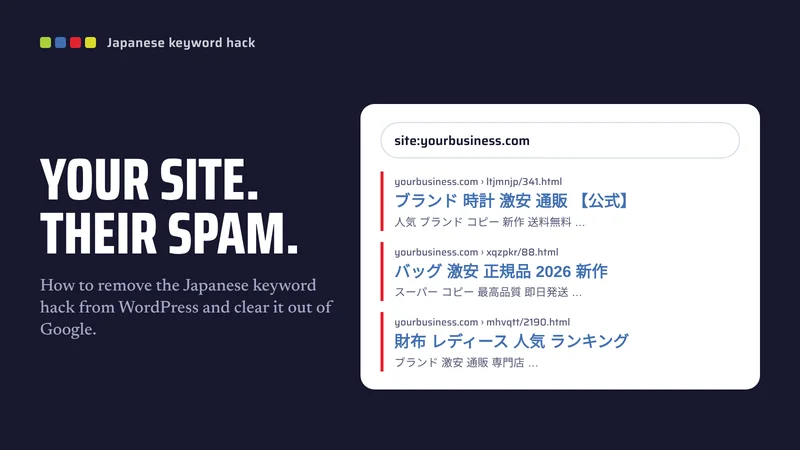
- Casino, pharma or Japanese spam pagesHundreds of spam posts or URLs appear in Google under your domain.
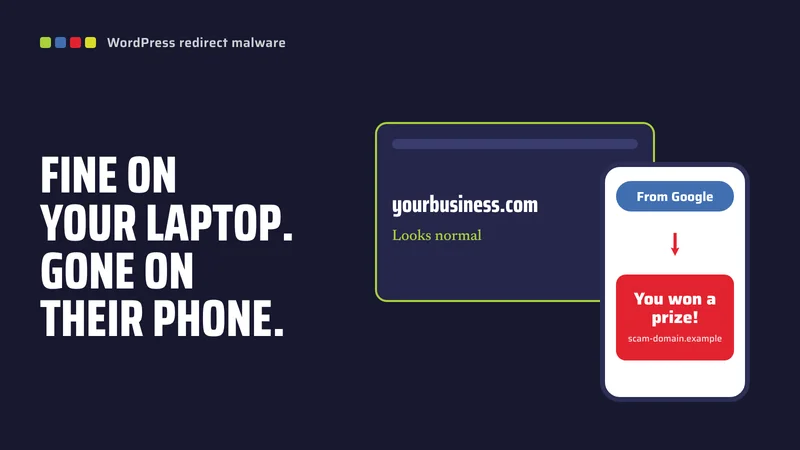
- Visitors are redirectedMobile users or visitors from Google land on scam, betting or fake update pages.
- Your host flagged or suspended the siteImunify360, a malware report or an email from your host listing suspicious PHP files.
- Admin users you did not createUnknown administrators, or accounts that come back after you delete them.
- Malware returns after cleaningYou or your host deleted the files, and days later the problem is back.
- Google warnings“This site may be hacked” in search results, or a red Safe Browsing warning in Chrome.
- Card skimmer on checkoutCustomers report fraud after buying from your WooCommerce store.
- White screen or locked outThe site is down, wp-admin will not load, or your password no longer works.
- Slow pages and strange JavaScriptPages load slowly, links in your emails get flagged, or unknown scripts load on every page.
Why the malware keeps coming back
Most cleanups delete the files a scanner flags and stop there. Modern WordPress malware expects that. It keeps spare copies and ways back in, so the site is reinfected days or even seconds later.
Sucuri’s 2023 Hacked Website Report found at least one backdoor on 49.21% of the compromised sites it cleaned, and malicious admin users in 55.2% of infected databases. In September 2026 it documented the SC backdoor, which keeps copies in at least eight places across files, the database and server memory, and rebuilds any copy you delete.
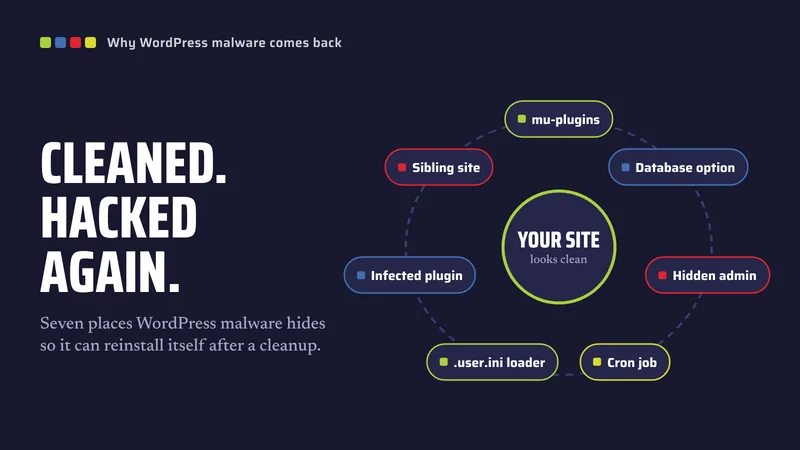
These are the seven places we check on every job:
- 1Must-use plugins
Files in
wp-content/mu-pluginsload on every request and do not appear in the normal plugin list. - 2Database copies
A copy of the payload stored in
wp_optionsrewrites the files after you delete them. - 3Hidden administrators
Admin accounts hidden from the Users screen, or recreated automatically after deletion.
- 4Scheduled tasks
WordPress cron events or server cron jobs that download the malware again every hour or day.
- 5Auto-loading files
.user.inior.htaccessrules that run a loader before every page. - 6Infected plugins and snippets
Code injected into legitimate plugins, themes or snippet tools, each copy slightly different.
- 7Other sites on the same account
One infected site reinfects every clean site that shares the hosting account.
Read the full guide: why WordPress malware keeps coming back ↗
How we clean a hacked WordPress site
The order matters as much as the tools. Delete the wrong file first and the surviving copies restore it straight away; change passwords too early and the malware steals the new ones. This is the sequence we follow on every site.
- 01Contain
Put the site behind maintenance mode or a firewall rule, block outgoing connections the malware uses, and take a full copy of files and database for evidence.
- 02Find the entry point
Read server logs, file change dates and plugin versions to find how the attacker got in: a vulnerable plugin, stolen password, leaked FTP account or a neighbouring site.
- 03Remove loaders first
Remove the files that load first (mu-plugins, drop-ins,
.user.ini,.htaccess) and restart PHP, so the surviving copies cannot rebuild what we delete. - 04Clean every copy
Replace WordPress core, plugins and themes with clean copies from official sources, remove injected code and clean the database, including options, posts and scheduled events.
- 05Lock the doors
Remove rogue admins, FTP, SFTP and hosting users, log everyone out, reset every password and generate new security keys last, once nothing is left to steal them.
- 06Sweep the whole account
Check every other site on the same hosting account, because one dirty site will reinfect the rest.
- 07Recover search and reputation
Return 410 for spam URLs, request Google and blocklist reviews, and clean Search Console of injected pages and sitemaps.
- 08Harden and monitor
Update everything, add a firewall, 2FA and file-change monitoring, then watch the site for 30 days.
What you get
Clients tell us the cleanup is only half of what they need. The other half is knowing what happened, being able to explain it to their own client or boss, and being confident it will not happen again.
- Root-cause reportHow the attacker got in, what they installed, what we removed and what we changed. Written so a non-technical owner can read it.
- Full file and database cleanupCore, plugins and themes replaced from clean sources; injected code, spam posts and malicious options removed.
- Access auditRogue admins, FTP and hosting accounts removed; passwords, sessions and security keys rotated.
- Whole-account sweepEvery other site on the same hosting account checked, so nothing reinfects the cleaned site.
- Google and blocklist recoverySpam URLs de-indexed, Search Console cleaned, warning reviews requested.
- Hardening and 30-day watchUpdates, firewall, 2FA and file-change monitoring, with a free re-clean if the same infection returns.
WordPress malware removal pricing
Fixed prices, agreed before we start. Agencies can resell any plan under their own brand.
Single site
$149
one WordPress site
- Full malware and backdoor removal
- Root-cause report
- Hardening and 2FA
- Google warning removal
- 30-day reinfection cover
Multiple sites
$149 + $79
per extra site on the same account
- Everything in Single site
- Cross-site sweep of the whole hosting account
- One report covering every site
- Agency and white-label friendly
Emergency
+$100
work starts within 4 hours
- Priority start, any day of the week
- Live updates on WhatsApp
- Card skimmer and checkout cases first
Ongoing security care plans from $49 a month. Want to leave WordPress after a hack? We rebuild content sites as fast static Astro websites from $500, with redirects so you keep your rankings.
Get a free malware check
Tell us what is happening. We reply with what we found, what it will take and a fixed price, usually within a few hours.
Not sure it is hacked? Run our free WordPress security checker first.
Faster: message us on WhatsApp or email hello@morkizdigital.com.
Got it. We are on it.
You will hear from us shortly with what we found and a fixed price. If the site is taking payments or redirecting customers, message us on WhatsApp now so we can start containing it.
Open WhatsAppWordPress malware removal FAQs
How much does WordPress malware removal cost?
Cleanup starts from $149 for one WordPress site, and $79 for each extra site on the same hosting account. Emergency starts within 4 hours add $100. You get a fixed price after a free check, before any work begins.
How long does it take to clean a hacked WordPress site?
Most single sites are cleaned within 24 hours of getting access. Large WooCommerce stores, multi-site accounts or sites with heavy database spam can take two to three days.
Why does my WordPress malware keep coming back after cleanup?
Because the visible malware was removed but the parts that reinstall it were not. The usual culprits are must-use plugins, a copy stored in the database, hidden admin users, scheduled tasks, .user.ini or .htaccess loaders, and other infected sites on the same hosting account.
My host already cleaned the site. Why is it still hacked?
Host scanners such as Imunify360 are good at finding known malicious files, but they usually do not remove database payloads, rogue admin users, cron jobs or the vulnerability that let the attacker in. We find and close those, then explain what the host scan missed.
Will you find out how the site was hacked?
Yes. Every cleanup includes a root-cause report in plain English: how the attacker got in, what they installed, what we removed and what we changed so it does not happen again. Agencies can forward it to their client.
Several of our WordPress sites are infected. Can you clean them all?
Yes. Sites that share a hosting account usually need to be cleaned together, because one infected site reinfects the others. We sweep the whole account and charge $79 for each extra site.
Do you offer a guarantee?
Yes. If the same infection returns within 30 days of our cleanup, we clean it again at no cost. If it comes back through a new vulnerability we did not cause, such as a newly disclosed plugin flaw, we tell you before charging anything.
Will I lose my content, design or SEO?
No. We clean in place and keep your posts, pages, media, theme and settings. If the malware damaged your theme, we repair or rebuild it to match the original design.
How do you remove “This site may be hacked” from Google?
After cleaning, we remove spam URLs, return 410 Gone so Google drops them, clean Search Console, and request a security review. Google usually clears the warning within a few days of a successful review.
Can you remove a credit card skimmer from WooCommerce?
Yes. Skimmers often hide in the database, in snippet plugins or in modified payment files. We remove them, check every checkout path, and advise on informing your payment provider.
What access do you need?
Hosting control panel or SFTP/SSH access, a WordPress administrator account and database access. We work on a copy where possible and remove our access when the job is done.
Can you clean casino or Japanese keyword spam?
Yes. We remove the injected posts, pages and database entries, delete the spam sitemaps the attacker submitted, and help Google de-index the spam URLs quickly.
Should we move away from WordPress after a hack?
Not always. A maintained WordPress site can be secure. But if your site is mostly content and rarely changes, a static site built with Astro has no PHP, no plugins and no database to attack. We can migrate your content and keep your rankings with redirects.
Do you offer ongoing WordPress security after the cleanup?
Yes. Care plans from $49 a month cover updates, off-site backups, firewall rules, malware scans, uptime monitoring and a fixed number of developer hours.